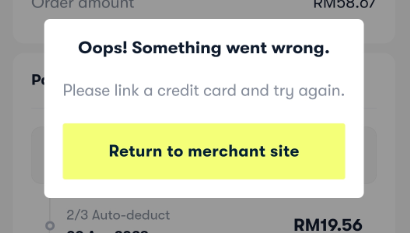
1. Why does this error occur?
This error is specific to Atome MY users and usually occurs when you have reached your credit card limit on Atome’s platform. Even if a credit card is already linked, Atome may block the transaction once the limit has been fully utilised or restricted by Atome’s internal checks.
2. What can I do if I see this error?
You may try the following steps:
- Ensure your credit card is correctly linked to your Atome account
- Check whether you have reached your Atome credit limit
- Try completing the payment again after confirming your available limit
If you have already linked a credit card and the error still appears, it means the issue cannot be resolved on our platform.
3. Who should I contact for further assistance?
If the error persists after linking a credit card, please contact Atome Support directly, as the restriction is controlled by Atome.
- Atome MY Support: [email protected]
Their team will be able to check your account status, credit limit, and any payment restrictions.
4. Can this issue be fixed by SEAGM?
No. This limitation is set by Atome’s system and cannot be overridden or modified by the merchant [SEAGM].
Thank you.
Visit the SEAGM Support site for quick answers and guides.
Need support? Contact our Customer Support via LiveChat .